What This Helps You Do
Use Overdue Members to see which member payment records may need owner or front desk follow-up.
The Overdue Members view helps you review members whose billing status or next billing date suggests a payment may need attention.
This article is about owner-managed overdue-member review in MatAdmin. It is separate from your academy's own MatAdmin subscription and separate from tax, accounting, payout, refund, dispute, or legal advice.
What Gym Owners Typically Use This For
Use Overdue Members when you need to:
- Review members who may need payment follow-up.
- Check the plan, amount due, and days overdue before contacting a member.
- Start a payment record from the overdue list.
- Confirm whether a member's billing status or next billing date needs review.
- Keep overdue-member follow-up separate from hosted Student Billing status and Billing Events.
Where To Find Overdue Members
Sign in to MatAdmin and open Billing.
Use the Overdue Members tab to review members who may need payment follow-up.
When no members match the overdue view, MatAdmin shows "All caught up!" and "No members are overdue for payment."
When members appear, the table shows the column labels Member, Plan, Amount Due, Days Overdue, and Action. Use Collect Payment when you are ready to start a payment record from this list.
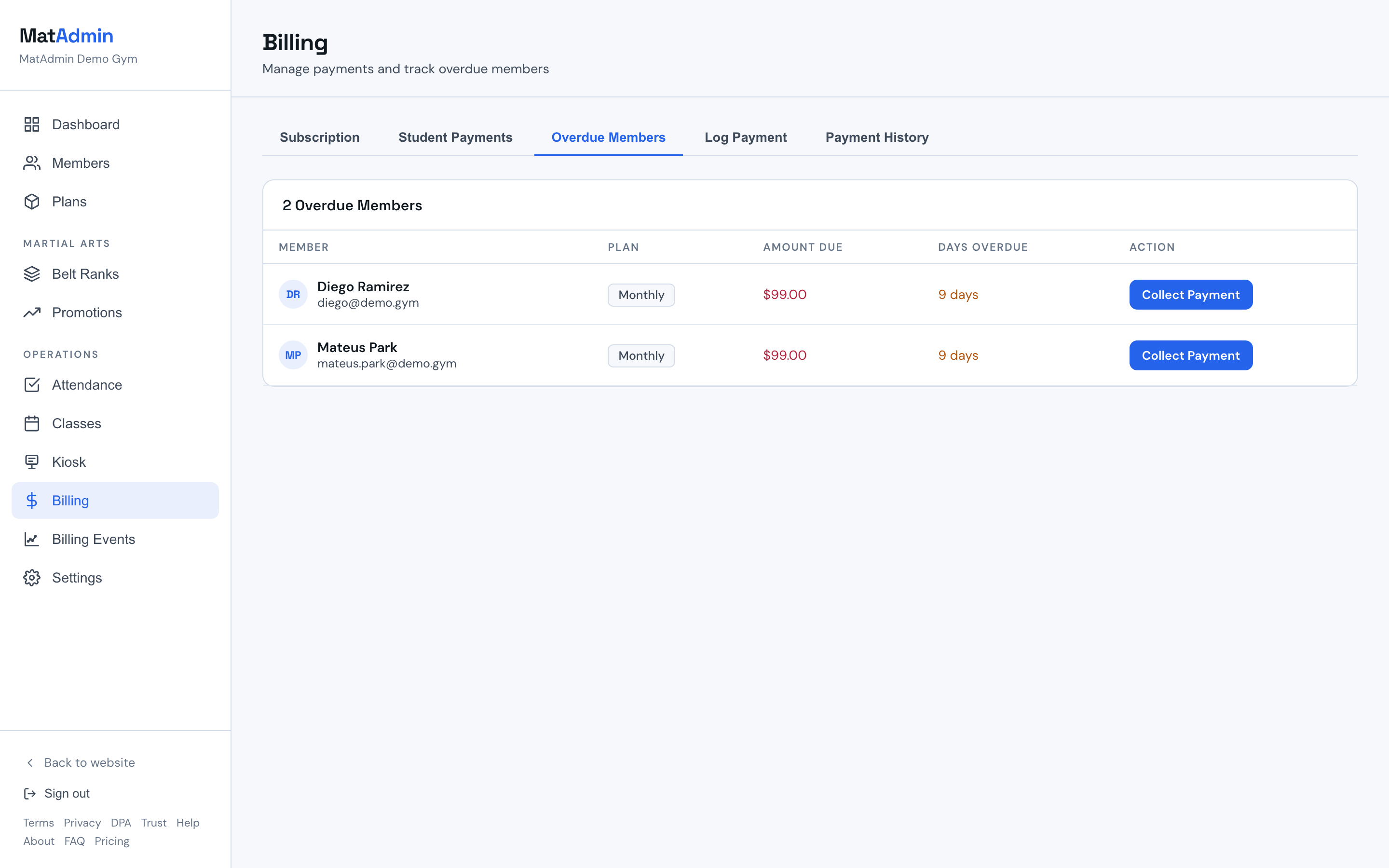
Why A Member Appears Overdue
A member can appear in Overdue Members when their Billing Status is set to Overdue.
A member can also appear when they are active and their Next Billing Date is before today.
The overdue list is a review surface. Before contacting a student or parent, check the member record, payment history, and any recent billing context your team has.
Using Collect Payment
Use Collect Payment when you are ready to record a payment for an overdue member.
Collect Payment opens the Log Payment workflow with the member selected and the plan amount filled in when available. Review the amount, payment date, method, and notes before saving.
After a payment is logged, MatAdmin records the payment, updates the member's billing status to Active, and advances the next billing date based on the member's plan duration.
Reviewing Billing Status And Next Billing Date
Billing Status and Next Billing Date are part of the member record.
Billing Status can be Active, Overdue, or Paused. Next Billing Date is the date MatAdmin uses when deciding whether an active member may be overdue.
Use Billing Status deliberately when a member should be treated differently from their Next Billing Date, such as a paused member, a comped arrangement, or a payment situation your team is handling outside the overdue list.
If a member appears in Overdue Members unexpectedly, open the member profile and review those fields before changing anything.
Overdue Members vs Payment History
Overdue Members is a follow-up list.
Payment History is where you review payment records that have already been logged in MatAdmin.
Use Overdue Members to decide what may need attention. Use Payment History to check previous logged payments, including the date, amount, method, and notes.
Overdue Members vs Student Billing
Student Billing status is separate from the Overdue Members list.
Student Billing may show hosted student billing details such as Stripe customer cache, subscription cache, Checkout cache, latest invoice cache, last known payment outcome, last update, or cancellation scheduling.
Use Student Billing when you need hosted billing status for a member. Use Overdue Members when you need to review owner-managed payment follow-up based on Billing Status or Next Billing Date.
Reviewing Billing Events
Billing Events provide operational context for hosted student billing activity.
Use Billing Events when you need to understand recent hosted payment updates, failed payment context, or items that may need review.
Billing Events are not the same as the Overdue Members list. They can provide helpful context, but they do not replace checking the member record or Payment History before follow-up.
Common Mistakes
- Treating Overdue Members as an automated collections workflow.
- Assuming every overdue item came from hosted Stripe billing.
- Contacting a member before checking the member record and recent payment history.
- Logging a payment without checking the amount, method, date, and member.
- Confusing Student Billing status with the member's Billing Status field.
- Using Billing Events as a replacement for Payment History.
- Treating overdue-member review as tax, accounting, refund, dispute, payout, or legal guidance.
When To Contact Support
Contact support if:
- A member appears overdue and you cannot tell why.
- Logging a payment does not update the member the way you expected.
- Billing Status, Next Billing Date, Payment History, Student Billing, or Billing Events appear confusing together.
- The Billing page or Overdue Members tab will not load.
Need help? Contact support at support@matadmin.app and include your academy name plus a short description of the issue.
Do not send full card numbers, bank details, passwords, or private login links in a support message.