What This Helps You Do
Use Belt Ranks to set up the rank hierarchy your academy uses for student records.
Belt ranks are configuration for martial arts progress tracking. They help MatAdmin show each student's current belt and stripe count consistently across member records, member lists, and promotion history.
This article is about configuring the rank list itself. Recording a student's promotion is a separate workflow.
What Gym Owners Typically Use This For
Use Belt Ranks when you need to:
- Review the belt hierarchy available in MatAdmin.
- Add a belt rank your academy tracks.
- Edit the name, color, stripe count, or order of a rank.
- Remove a rank that is no longer used.
- Understand why a rank cannot be deleted while members are assigned to it.
Where To Find Belt Ranks
Sign in to MatAdmin and open Belt Ranks from the Martial Arts section.
The Belt Ranks page shows your hierarchy in position order. Each rank displays its name, color, number of martial-arts stripes, and how many current members are assigned to that rank.
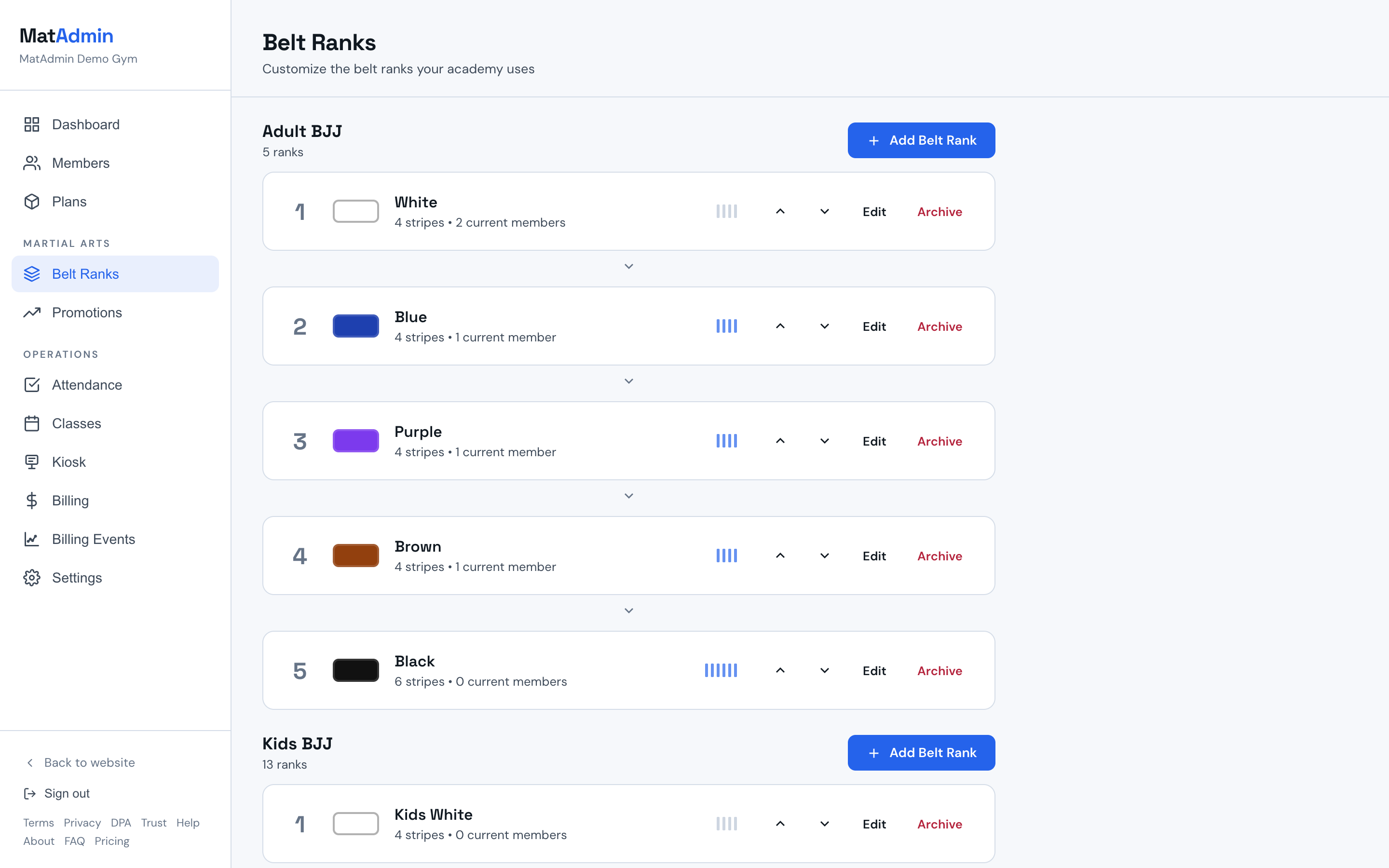
Understanding Belt Rank Fields
Each belt rank has setup fields that control how it appears in MatAdmin:
- Belt Name: the rank name shown to owners and instructors.
- Belt Color: the color used for the visual belt display.
- Number of Stripes: how many martial-arts rank stripes can be shown for that belt.
- Position Order: the rank's place in the hierarchy.
Belt stripes are martial-arts rank stripes. They are unrelated to Stripe payments, student billing, subscriptions, Billing Events, Billing Status, or Payment History.
Promotion Guidelines
Each belt can also have optional Promotion guidelines:
- Classes at this belt: the number of recorded class check-ins you want to use as a review guideline for that belt.
- Time at this belt (months): the amount of time you want to use as a review guideline for that belt.
These fields are blank by default. They apply to one belt in one program, so Adult Gi and No-Gi can have different guidelines if your academy uses different programs.
When a belt has stripes, the edit form also shows a Customize per stripe section. Each stripe gets its own optional pair of fields:
- Classes since previous promotion: recorded check-ins since the student's last promotion.
- Months since previous promotion: time since the student's last promotion.
The two belt-level fields keep their original meaning: totals for the whole belt. Per-stripe fields describe one stage at a time. For example, a white belt can ask for 25 classes and 3 months for the first stripe, while the belt-level fields hold the totals you expect before the next belt. Leave a stripe blank when you do not want guidance for that stage. A belt with no per-stripe values works exactly as before.
If you lower a belt's number of stripes, saved per-stripe values above the new count are kept but ignored. Raise the count again and they come back.
Guidelines help you spot students worth reviewing. They never promote anyone, and they never stop you from promoting anyone. You still make the call and record any promotion manually.
Students who meet your guidelines can appear in Ready for your review on the Promotions page. See Recording Promotions for how those review prompts appear.
Adding A Belt Rank
Use Add Belt Rank when your academy needs a rank that is not already in the hierarchy.
Enter the belt name, choose the belt color, set the number of stripes, and choose a position order if you need the rank placed at a specific point in the hierarchy.
If you leave the position order blank, MatAdmin can place the rank after the existing ranks.
Editing A Belt Rank
Use Edit when you need to update a rank's display details.
You can adjust the belt name, belt color, number of stripes, or position order. Changes affect how that rank appears wherever it is used in member records.
Before changing an existing rank, consider whether the change is a display correction or whether your academy is trying to record a student's movement to a new rank. Student movement should be handled through the promotion workflow, not by changing the rank definition.
Deleting A Belt Rank
Use Delete only for a rank that should no longer be available and has no members assigned to it.
MatAdmin prevents deleting a belt rank when current members are assigned to that rank. Reassign or promote those members first, then delete the rank if it is still no longer needed.
This restriction helps prevent member records from pointing to a rank that no longer exists.
Belt Ranks And Member Records
A member record can show a current belt rank and current stripe count.
The Belt Ranks page defines the available rank options. Member records use those options to display each student's current rank.
When adding a new member, you can assign an initial belt rank if you know it. Existing member rank changes should be recorded through the promotion workflow so the member's history stays intact.
Common Mistakes
- Editing a rank definition when you meant to record a student's promotion.
- Deleting a rank before checking whether members are assigned to it.
- Treating martial-arts stripes as Stripe payment or billing information.
- Using belt-rank setup to track billing status, payment history, subscriptions, or Billing Events.
- Creating duplicate ranks when changing the position order would solve the hierarchy issue.
When To Contact Support
Contact support if:
- A belt rank cannot be deleted and you cannot tell which members are assigned to it.
- A rank appears in the wrong place after editing position order.
- A member's current rank does not look the way you expected after a setup change.
- You are unsure whether to edit a belt rank or record a promotion.
Need help? Contact support at support@matadmin.app and include your academy name plus a short description of the belt-rank setup issue.