What This Helps You Do
Use promotions to record martial arts rank changes for a student.
Promotion decisions are owner-controlled and manual. MatAdmin stores the promotion record, updates the student's current belt display, and keeps a promotion history on the member profile.
This article is about recording promotion activity. Belt-rank setup is a separate configuration workflow.
What Gym Owners Typically Use This For
Use promotion records when you need to:
- Record that a student moved to a belt or stripe.
- Preserve the promotion date, instructor, transfer status, and notes.
- Review a student's Promotion History from their member profile.
- Review recent promotion records from the Promotions page.
- Understand how deleting a promotion affects the student's current belt display.
Where To Record A Promotion
Open the student's member profile and use Promote.
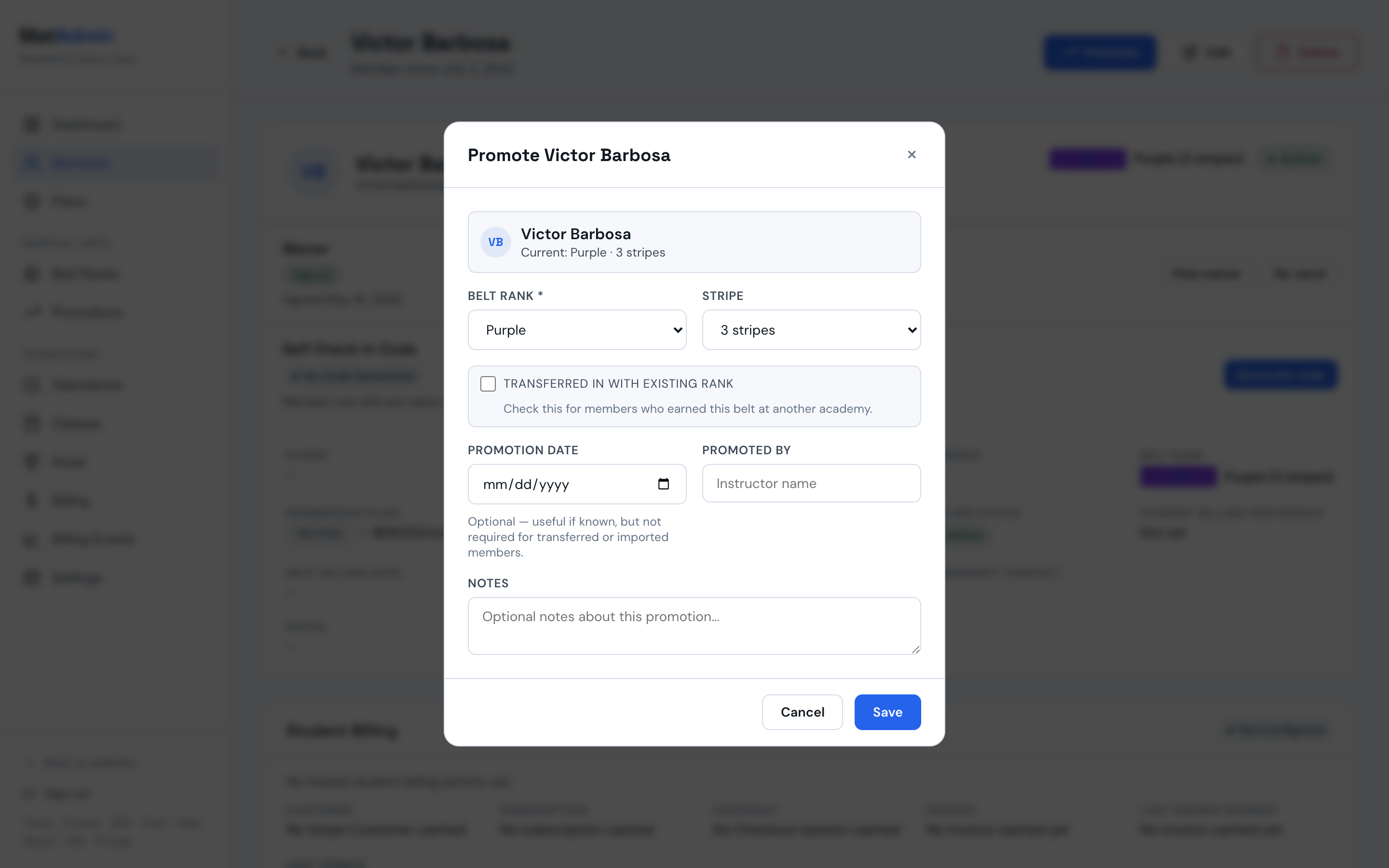
The Promote action opens a form for recording the student's new rank information. Save the promotion after reviewing the belt rank, stripe, date, promoted-by field, transfer status, and notes.
Promotion Record Fields
Promotion records can include:
- Belt Rank: the belt rank being recorded for the student.
- Stripe: the martial-arts stripe count for that belt.
- Promotion Date: the date of the promotion, if known.
- Promoted By: the instructor or person who promoted the student, if you track that.
- Transfer Status: whether the student transferred in with an existing rank.
- Notes: optional context your team may need later.
Belt stripes are martial-arts rank stripes. They are unrelated to Stripe payments, student billing, subscriptions, Billing Events, Billing Status, or Payment History.
Transferred-In Students
Use the transferred-in option when a member earned the rank somewhere else and you are recording it for your academy's records.
The promotion date is optional. This helps when the exact date is unknown for transferred or imported members.
Promotion History
Each member profile includes Promotion History.
Promotion History shows the member's recorded belt and stripe changes, including transfer status, date when available, promoted-by information when provided, and notes when present.
Use Promotion History when you need to understand how a student's current belt record was built over time.
Promotions Page
Open Promotions from the Martial Arts section to review promotion activity across members.
The Promotions page shows recent promotion records and links back to the relevant member profile. Use it as a broad review view when you are checking recent rank activity across the academy.
Ready For Your Review
The Promotions page can show a Ready for your review section above recent promotion records.
Students appear there when they meet your Promotion guidelines for their next stripe or their current belt, or when a coach flags them for promotion review from the member profile. MatAdmin sorts the list by the longest time at the current belt first.
Each row shows the student, program, current belt, time at that belt, and a short explanation using your own guideline numbers. For example, a row can show that a student has 72 classes and 14 months at this belt, with your guidelines shown as 60 classes and 12 months.
When the student's next step is a stripe with its own guideline, the row names it, such as "meets your guidelines for 2nd stripe", and the counts are measured since the student's last promotion. The Review button then opens the Promote form with that stripe already selected. You can change it before saving.
Use the program filter to focus on one program. Use the status filter to show all rows, rows that meet your guidelines, or rows that were flagged.
The Review button opens the same Promote form you use from the member profile. You still decide whether to record a promotion.
If no Promotion guidelines exist anywhere, the empty message points you back to belt-rank setup. If guidelines exist but no students are waiting on your review, MatAdmin shows a quiet empty message.
Promotion Readiness On Member Profiles
Each member profile can show a Promotion readiness panel.
The panel is per program. If a student trains in more than one program, each program can show its own belt, time at that belt, guidelines, and review flag.
When guidelines are set for the student's current belt, the panel shows plain-count progress such as "Classes: 31 of 40" and "Time: 7 months of 12 months." It stays as counts instead of a calculated meter.
When the student's next stripe has its own guideline, the panel names the stripe it is measuring toward, and the counts run from the student's last promotion instead of from belt entry.
If no guidelines are set for that belt, the panel says that no guidelines are set for that belt. If the student is at the top of the program ladder, the panel says that too.
Coach Review Flags
Staff and owners can flag a student for promotion review from the Promotion readiness panel on the member profile.
Use Flag for promotion review to add the flag. The optional note can capture what the coach wants the owner to review.
Flagged students appear in Ready for your review on the Promotions page, even if they do not meet any configured guideline.
When a flagged student is promoted, MatAdmin clears the flag automatically. Use Remove flag to clear it manually without recording a promotion.
Data To Review Carefully
Promotion readiness depends on the records MatAdmin has.
Class counts start when the student entered their current belt and only include attendance MatAdmin has recorded. If you imported members from another system, training history from before MatAdmin will not be counted unless it exists as recorded attendance in MatAdmin.
Class counts include all recorded check-ins for the student, regardless of program.
Time at the current belt comes from the student's recorded belt history when MatAdmin has it. For imported members without promotion history, MatAdmin estimates time at the current belt from the member's start date until the first recorded promotion.
Per-stripe progress is stricter. It counts only from a promotion you recorded in MatAdmin, so for students who were in your academy before per-stripe guidelines existed, per-stripe tracking starts with the next promotion you record for them. MatAdmin does not estimate stage dates from older records, because a guessed number shown as fact is worse than no number. Belt-level guidance keeps working for everyone in the meantime.
Worth A Look
The Promotions page can also show a Worth a look panel.
Worth a look is an informational observation area for owner review. It uses attendance-informed training patterns, such as a student training consistently or returning after a gap, to help you notice records you may want to review.
Worth a look is separate from Promotion guidelines and Ready for your review. It does not make promotion decisions or record promotions for students. The owner or instructor still decides whether any promotion should be recorded.
Deleting A Promotion
Use delete only when a promotion record was entered incorrectly or should no longer be part of the member's history.
When a promotion record is deleted, MatAdmin recalculates the member's current belt from the latest remaining promotion record. If no promotion records remain, the member's current belt rank is cleared and the stripe count returns to zero.
Review the member profile after deleting a promotion to confirm the current belt display looks right.
Promotions And Billing Are Separate
Belt-rank and promotion workflows are independent of billing workflows.
Promotions do not depend on Student Billing, Billing Status, Payment History, Billing Events, Stripe, subscriptions, invoices, or payment state.
Use billing pages for payment and subscription questions. Use Promotions and member Promotion History for martial arts rank records.
Common Mistakes
- Treating Worth a look as something that records promotions for you.
- Treating Ready for your review as a decision instead of a review list.
- Expecting imported training history from before MatAdmin to appear in class counts.
- Recording a promotion when you meant to edit the belt-rank setup.
- Leaving transfer status unchecked for a member whose rank was earned before joining your academy.
- Deleting a promotion without checking how it will affect the student's current belt display.
- Confusing martial-arts stripes with Stripe payments or student billing.
- Using promotion history as a substitute for attendance history, billing records, or membership status.
When To Contact Support
Contact support if:
- A promotion will not save.
- Promotion History does not show what you expected.
- A deleted promotion changed the current belt display in a way you do not understand.
- The Promotions page or member Promote action will not load.
- You are unsure whether to record a promotion or update belt-rank setup.
Need help? Contact support at support@matadmin.app and include your academy name, the member name, and a short description of the promotion record issue.