What This Helps You Do
Track whether each member has a waiver on file, send a per-member digital signing link, and review the signed waiver record from the member profile.
MatAdmin tracks one waiver status per member. A member can sign online with a typed signature, or you can mark the waiver signed offline when you already have a paper or external waiver on file.
Before You Start
Use this workflow when you need to follow up with members who are missing waivers or record that a member has already completed one outside MatAdmin.
MatAdmin records waiver status and signing details. It does not decide what waiver language your academy should use or what a signed record means for your academy.
Where to Find Waivers
You can find waiver status in several places:
- The dashboard Waivers summary card, which shows how many members are missing waivers.
- The Members table, where each member has a Waiver status column.
- The member detail page, where the Waiver card shows the current status and available actions.
From the dashboard Waivers card, choose Review members to go to the member list and follow up with members who still need a waiver.
Send a Digital Waiver Link
Use Send waiver from a member's Waiver card when the member needs to sign online.
MatAdmin creates a signing link for that member. You can:
- Copy the signing link and send it yourself.
- Use the email option to open a draft message with the signing link.
The link is specific to that member. The signer does not need to log in to MatAdmin to open the signing page.
If you re-send a waiver link to a member who has already signed, MatAdmin sends the same member link again. Re-sending does not create a new waiver version or start a new signing requirement.
What the Signer Sees
When the member opens the signing link, MatAdmin shows:
- Your gym name.
- The student's name.
- The waiver agreement text. The signer can switch the page between English and Spanish.
- Full Name.
- Guardian Name, if a parent or guardian is signing.
- Relationship, if a parent or guardian is signing.
- Signature.
- The signing date.
The Signature field is typed text. MatAdmin does not capture a drawn signature image.
After the signer submits the form, the member's waiver status changes to signed. If the same signing link is opened again after signing, MatAdmin shows that the waiver has already been signed instead of showing a new signing form. Submitting the form again through that link is rejected, and the existing signed waiver record is not changed.
Mark a Waiver Signed Offline
Use Mark signed offline when you already have a waiver completed outside MatAdmin.
MatAdmin asks for:
- Signer name.
- Signed date.
- An optional note.
Offline records are useful when you keep a paper waiver or an external waiver record somewhere else. MatAdmin stores the offline status and note, but it does not store a typed digital signature for offline records.
View a Signed Waiver Record
Use View waiver from the member's Waiver card after a waiver is signed.
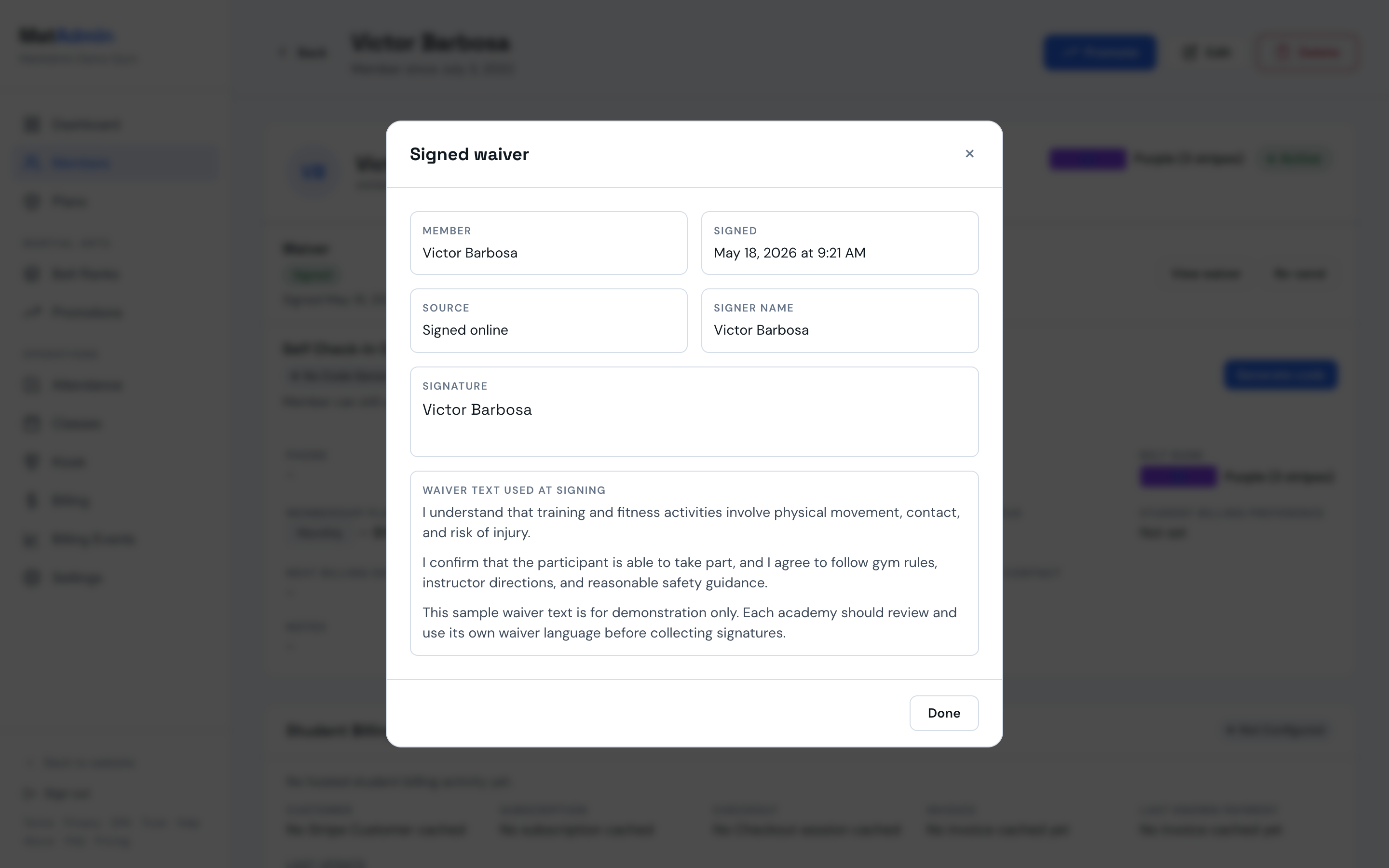
The signed waiver record can show:
- Member name.
- Signed timestamp.
- Source, such as online or offline.
- Signer name.
- Guardian name, if one was entered.
- Relationship, if one was entered.
- Offline note, if one was entered.
- Typed signature for online records.
- Agreement version, language at signing, the exact agreement text the signer saw, and an integrity hash, for online records with retained agreement text.
The agreement text section depends on how and when the waiver was signed:
- Online waivers signed on or after August 29, 2026 show the exact agreement text the signer saw, plus its version, the language it was shown in, and an integrity hash (a cryptographic fingerprint of that text).
- Online waivers signed before that date show that historical agreement text is unavailable, because MatAdmin did not retain agreement text at signing yet.
- Offline waivers show that the waiver was signed on paper outside MatAdmin and no agreement text was captured.
For offline records, MatAdmin shows that the signature was not captured in MatAdmin.
What MatAdmin Stores
For online waiver signing, MatAdmin stores:
- Signed status.
- Signed timestamp.
- Signer name.
- Guardian name, if entered.
- Relationship, if entered.
- Typed signature text.
- Online source.
- The exact agreement text shown at signing, with its version and language, for waivers signed on or after August 29, 2026.
- An integrity hash of that text, so the record can be verified independently.
For offline waiver records, MatAdmin stores:
- Signed status.
- Signed date.
- Signer name.
- Offline source.
- Optional note.
Retained agreement text, version, language, and integrity hash are included in your gym data export, so you can keep an independent copy of what each member agreed to.
To configure your gym's agreement, see Setting Up Your Waiver Agreement. The full export also includes gym_waiver_agreements.csv for published versions and gym_waiver_agreement_drafts.csv for unpublished owner content.
MatAdmin does not generate a PDF waiver record or downloadable evidence packet from this workflow.
Current Limitations
Current waiver behavior is intentionally simple:
- MatAdmin tracks one waiver status per member.
- MatAdmin does not manage multiple waiver documents per member.
- MatAdmin does not include custom waiver-template editing.
- Waivers signed before August 29, 2026 do not include retained agreement text.
- Re-sending a waiver link does not reset the member's waiver status or require a new signature.
- MatAdmin does not generate waiver PDFs.
- MatAdmin does not capture drawn signature images.
If your academy needs a member to sign a new or different waiver, handle that outside MatAdmin for now and update the member's waiver status once your process is complete.
When to Contact Support
Contact support if:
- A member cannot open a waiver link.
- A waiver link says it is invalid or expired.
- A signed waiver does not appear on the member profile after signing.
- You are unsure whether to mark a waiver signed offline.
- Waiver status in the dashboard and member profile does not match what you expect.